

- Key Takeaways
- Why Do Network Devices Need NDES Instead of Standard Domain Authentication?
- How Does the NDES Enrollment Process Work?
- What Are the Security Best Practices for Running NDES?
- What Are the Benefits of Centralizing Device Enrollment Through NDES?
- NDES Enrollment Process
- NDES Security Best Practices
- How Encryption Consulting Helps
- Frequently Asked Questions
- Automate Network Device Certificate Enrollment
Network Device Enrollment Service (NDES) is an Active Directory Certificate Services role that lets routers, switches, and other network devices without domain credentials request and receive digital certificates over the Simple Certificate Enrollment Protocol (SCEP).
NDES is a Windows Server role, available since Windows Server 2008 R2, that acts as a Registration Authority between network devices and a Certification Authority. It uses SCEP so devices lacking domain credentials, such as routers and firewalls, can request, receive, and renew certificates without manual configuration on each device.
Key Takeaways
- NDES has shipped as an Active Directory Certificate Services (AD CS) role since Windows Server 2008 R2.
- It uses the Simple Certificate Enrollment Protocol (SCEP) to bridge devices that cannot hold domain credentials with a Certification Authority.
- The enrollment flow uses a one-time password: an administrator requests it from NDES, then configures the device to submit it with the certificate request.
- Best practice is a two-year validity period on device certificate templates to reduce renewal overhead, versus the one-year default on the IPsec offline request template.
- Disabling the NDES service when it is not actively enrolling devices clears cached one-time passwords and closes an otherwise-open issuance window.
Why Do Network Devices Need NDES Instead of Standard Domain Authentication?
Routers, firewalls, switches, and other network appliances typically cannot store or present domain credentials the way a user’s workstation can. NDES solves this by acting as the Registration Authority in a SCEP exchange, standing between the device and the Certification Authority so the device never needs domain credentials at all.
How Does the NDES Enrollment Process Work?
NDES enrollment runs through nine coordinated steps between the device, an administrator, NDES, and the CA.
- The network device generates a public-private key pair.
- An administrator requests a one-time password from NDES.
- NDES checks the administrator’s permissions against Active Directory.
- NDES issues the one-time password once verification succeeds.
- The administrator configures the device with the password and points it to the organization’s PKI.
- The device sends an enrollment request to NDES.
- NDES forwards the validated request to the CA server.
- The CA issues a certificate for the device.
- NDES retrieves the certificate from the CA and delivers it to the device.
What Are the Security Best Practices for Running NDES?
- Lock down the server: run the Security Configuration Wizard to harden IIS and any other services installed on the NDES host.
- Limit local admin membership: restrict the local administrators group to PKI Admins only, and grant interactive, remote interactive, batch, and service logon rights solely to that group.
- Extend device certificate validity: build a version 2 certificate template with a two-year validity for signing, encryption, or general-purpose device certificates, since the default IPsec offline request template is limited to one year.
- Disable NDES when idle: stopping the service prevents unauthorized issuance and clears any unused one-time passwords from the service cache.
What Are the Benefits of Centralizing Device Enrollment Through NDES?
- Network security: certificates verify device identity, reducing the risk of unauthorized devices joining the network.
- Centralized device management: administrators manage certificate-based authentication for many devices from one console instead of configuring each device manually.
- Scalability: NDES is built to handle certificate enrollment for large fleets of network devices across an enterprise environment.
NDES Enrollment Process
The NDES enrollment process involves several key components:
- Device/Client: Clients are the network devices (router, switch, etc.) that require certificates.
- NDES Server (RA): The Registration Authority (RA) acts as an intermediate server, which bridges the communication between the client device and the Certification Authority.
- Certification Authority (CA) Server: The CA server issues certificates based on predefined policies and validates device requests forwarded by NDES.
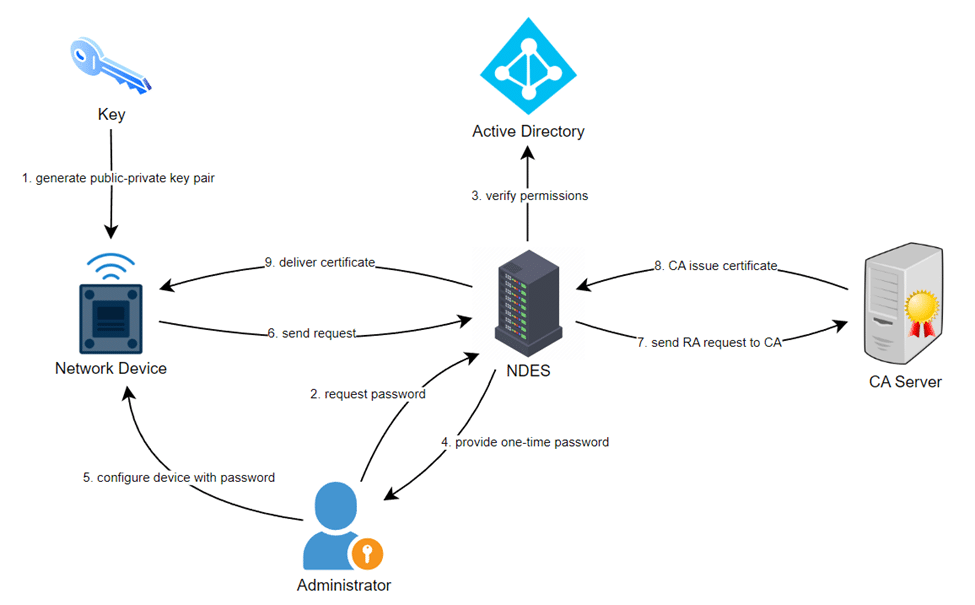
The overall enrollment process includes:
- Key Generation: Initially, a public-private key pair is generated on the network device.
- Password Request: The administrator requests a one-time password from NDES.
- Check Permissions: NDES verifies the request and checks for administrator’s permissions with the Active Directory.
- Password Delivery: If verification is successful, the NDES server provides a one-time password to the administrator.
- Device Configuration: The administrator configures the device with the password and sets it to trust the organization’s PKI.
- Enrollment Request: Once, the device is set-up, it sends an enrollment request to the NDES server.
- Request Forwarding: NDES acknowledges the enrollment request and forwards it to the CA server.
- Certificate Issuance: The CA validates the request and issues a certificate for the device.
- Certificate Retrieval: NDES receives the certificate from the CA and delivers it to the device.
NDES Security Best Practices
-
Lock down the server using Security Configuration Wizard
The Security Configuration Wizard will recommend locking down IIS and other services installed on the NDES server.
-
Ensure system hardening
Reduce the number of local admins groups to include only PKI Admins. Only members of the PKI Admins group are granted any logon user rights (interactive, remote interactive, log on as a batch job, log on as a service).
-
Create extended validity period device certificates
The default IPsec (Offline Request) certificate template has only a one-year validity period. If you define custom signing, encryption, or general-purpose certificate templates, consider creating a version 2 certificate template with a two-year validity period. A longer validity period reduces the management overhead for requesting device certificates.
-
Disable the NDES service when not in use
Stopping the NDES service ensures that unauthorized certificates will not be issued. Stopping the service also ensures that all data, such as all passwords that were not used by network devices, is cleared from the service cache.
How Encryption Consulting Helps
Encryption Consulting’s PKI-as-a-Service and PKI Services team design and harden NDES deployments, including registration authority placement, certificate template validity periods, and role-based access to the NDES host, so network device enrollment stays automated and auditable. Backed by ISO/IEC 27001:2022 and SOC 2 certified practices.
Frequently Asked Questions
What protocol does NDES use to issue certificates?
NDES uses the Simple Certificate Enrollment Protocol (SCEP). SCEP lets a network device that cannot hold domain credentials submit a certificate request, backed by a one-time password, through NDES acting as the Registration Authority to the Certification Authority.
Which Windows Server versions support NDES?
NDES has been available as an Active Directory Certificate Services role starting with Windows Server 2008 R2, and it remains a supported AD CS role in current Windows Server releases.
Why should NDES be disabled when not actively enrolling devices?
Stopping the NDES service prevents unauthorized certificate issuance and clears any one-time passwords sitting unused in the service cache, closing a window that an attacker could otherwise use to request a fraudulent device certificate.
How long should a device certificate’s validity period be?
The default IPsec offline request template is valid for one year. For custom signing, encryption, or general-purpose templates, a two-year validity period is a common practice, since it reduces renewal and management overhead without extending exposure past what most device lifecycles justify.
Automate Network Device Certificate Enrollment
Encryption Consulting’s PKI-as-a-Service can host and harden your NDES role, manage SCEP-based enrollment for thousands of devices, and keep certificate templates aligned with best-practice validity periods. Explore PKI-as-a-Service to see how it fits your network.
- Key Takeaways
- Why Do Network Devices Need NDES Instead of Standard Domain Authentication?
- How Does the NDES Enrollment Process Work?
- What Are the Security Best Practices for Running NDES?
- What Are the Benefits of Centralizing Device Enrollment Through NDES?
- NDES Enrollment Process
- NDES Security Best Practices
- How Encryption Consulting Helps
- Frequently Asked Questions
- Automate Network Device Certificate Enrollment