

- Key Takeaways
- How Does Multi-Factor Authentication Work?
- Types of Multi-Factor Authentication
- Why Is Multi-Factor Authentication Essential?
- Phishing-Resistant MFA: The New Baseline
- Are MFA and 2FA the Same?
- How Is MFA Different from Single Sign-On (SSO)?
- What Is Adaptive Authentication (Adaptive MFA)?
- Important Things to Know About MFA
- Best Practices for Implementing MFA and SSO
- How Encryption Consulting Helps
- Frequently Asked Questions
- Strengthen Your Authentication Strategy
Multi-factor authentication (MFA) is a security process that requires a user to verify their identity with two or more independent factors, such as a password, a hardware security key, or a fingerprint, before access to an account or application is granted.
Multi-factor authentication protects accounts by combining at least two verification factors: something you know (a password or PIN), something you have (a phone, authenticator app, or security key), and something you are (a fingerprint or face scan). Even if an attacker steals the password, the account stays protected because the remaining factors are still required.
Key Takeaways
- MFA requires two or more independent verification factors drawn from three categories: something you know, something you have, and something you are.
- A 2023 Microsoft Research study found that MFA reduces the risk of account compromise by 99.22 percent, and by 98.56 percent even when credentials have already leaked.
- NIST SP 800-63B-4, published in July 2025, requires services assessed at Authentication Assurance Level 2 (AAL2) to offer a phishing-resistant option such as FIDO2/WebAuthn.
- PCI DSS 4.0.1 Requirement 8.4.2 has mandated MFA for every user accessing the cardholder data environment, administrative or otherwise, since March 31, 2025.
- CISA classifies FIDO2/WebAuthn and PKI-based authentication as the only phishing-resistant MFA methods; SMS one-time passwords are the weakest common form.
How Does Multi-Factor Authentication Work?
MFA works by layering verification factors from at least two of three independent categories, so a single stolen credential is never enough to grant access. MFA is a core component of Identity and Access Management (IAM): where a password-only login has one point of failure, MFA forces an attacker to defeat each additional factor separately.
Something You Know
This is a password, PIN, or security question answer, and it serves as the first line of defense. Knowledge factors are also the easiest to steal: they can be phished, guessed, leaked in breaches, or extracted through social engineering. Strong, unique passwords help, and security questions add little on their own, which is exactly why MFA pairs knowledge factors with something harder to copy.
Something You Have
This is a physical object in your possession: a phone that receives a one-time password (OTP), an authenticator app such as Google Authenticator or Microsoft Authenticator that generates time-limited codes, or a hardware security key such as a YubiKey. Even if an attacker knows your password, they cannot complete the login without the device.
Something You Are
This covers biometrics: fingerprints, facial recognition, and voice patterns. Biometric traits are difficult to replicate and are now standard in banking apps, healthcare systems, government services, and modern phones and laptops. Platform authenticators such as Windows Hello and Apple Touch ID combine a biometric check with device-bound cryptographic keys, which turns convenience into genuinely strong authentication.
A Real-Life Example of MFA
When you log in to your bank account, you first enter your user ID and password (something you know). The bank then asks for a one-time password delivered to your phone or generated in its app (something you have). Some banking apps add a third factor, a fingerprint or face scan (something you are). An attacker who cracks the password still cannot get in without your phone or your biometrics.
Types of Multi-Factor Authentication
MFA methods range from SMS codes to hardware security keys, and they differ widely in how well they resist phishing. The table below covers the common methods and where each one is weak.
| Method | How it works | Security notes |
| Passwords | The knowledge factor most logins start with | Weakest on its own; phishable, guessable, and frequently reused |
| Email codes | A one-time code sent to your inbox | Fails completely if the email account itself is compromised |
| SMS / call OTPs | A one-time password sent by text or voice call | Vulnerable to SIM swapping and real-time phishing relay; weakest common MFA form per CISA |
| Authenticator apps | Time-based OTPs (TOTP) generated on the device | Stronger than SMS; not tied to a phone number, still phishable via fake login pages |
| Push notifications | Approve or deny prompt in a mobile app | Susceptible to push bombing; number matching mitigates but does not remove phishing risk |
| Biometrics | Fingerprint, face, or voice verification | Hard to replicate; strongest when bound to a device key, as in passkeys |
| Hardware keys / passkeys (FIDO2) | Cryptographic challenge signed by a security key or platform authenticator | Phishing-resistant; the credential only works on the legitimate site |
| Magic links | A login link emailed to the user | Convenient; inherits every weakness of the email account |
| Social login | Authentication delegated to Google, Facebook, or Apple | Convenient; security depends entirely on the linked platform account |
| Security questions | Pre-set answers only the user should know | Weak; answers are often guessable or publicly discoverable |
| Adaptive authentication | Risk-based step-up using context signals | Adds friction only when risk is high; strength depends on the factors it steps up to |
Why Is Multi-Factor Authentication Essential?
MFA is essential because it removes the single point of failure that passwords create, and the measured effect on account compromise is dramatic.
- Enhanced security: A 2023 Microsoft Research study of Azure Active Directory accounts found that MFA reduces the risk of compromise by 99.22 percent across the entire population, and by 98.56 percent even for accounts whose credentials had already leaked.
- Reduced risk of cyberattacks: MFA blunts phishing, credential stuffing, and password spraying because a stolen password alone no longer opens the account. After Google auto-enrolled more than 150 million users in 2-Step Verification, it reported a 50 percent decrease in compromised accounts among those users.
- Compliance requirements: MFA is now written into major frameworks rather than merely recommended. PCI DSS 4.0.1 Requirement 8.4.2 mandates MFA for all access to the cardholder data environment as of March 31, 2025, and NIST SP 800-63B-4 defines the authentication assurance levels that regulators and auditors reference.
- Protection for sensitive information: For organizations handling financial records, personal data, or intellectual property, MFA sharply lowers the odds that a leaked credential turns into a data breach.
- Securing cloud and hybrid environments: Cloud consoles are reachable from anywhere, which makes strong authentication the primary access control. AWS has enforced MFA for root users in stages since May 2024 and extended the requirement to root users across all account types in June 2025.
Phishing-Resistant MFA: The New Baseline
Phishing-resistant MFA uses cryptographic authentication bound to the legitimate website, so credentials cannot be intercepted, relayed, or typed into a fake login page. The strongest MFA gives users nothing to type and attackers nothing to steal.
Not all MFA holds up against modern attacks. Adversary-in-the-middle phishing kits relay one-time codes in real time, push bombing wears users down until they approve a fraudulent prompt, and SIM swapping redirects SMS codes to an attacker-controlled device. CISA’s Implementing Phishing-Resistant MFA fact sheet (October 2022) ranks MFA forms from strongest to weakest and identifies only two phishing-resistant implementations: FIDO2/WebAuthn authentication and PKI-based authentication such as PIV smart cards.
FIDO2 combines the W3C WebAuthn standard with the FIDO Alliance’s CTAP protocol. The credential is a public-private key pair scoped to the real domain, so a signature produced for a lookalike phishing site is simply invalid. Passkeys, promoted by Apple, Google, and Microsoft, bring the same cryptography to consumer accounts through platform biometrics.
NIST SP 800-63B-4, published in July 2025, makes the direction explicit: services assessed at AAL2 must offer a phishing-resistant authentication option, and no one-time password method qualifies. Where phishing-resistant MFA cannot be deployed yet, CISA recommends number matching on push notifications as an interim control.
Are MFA and 2FA the Same?
No. Two-factor authentication (2FA) is a subset of MFA that uses exactly two verification factors, while MFA covers any method that uses two or more.
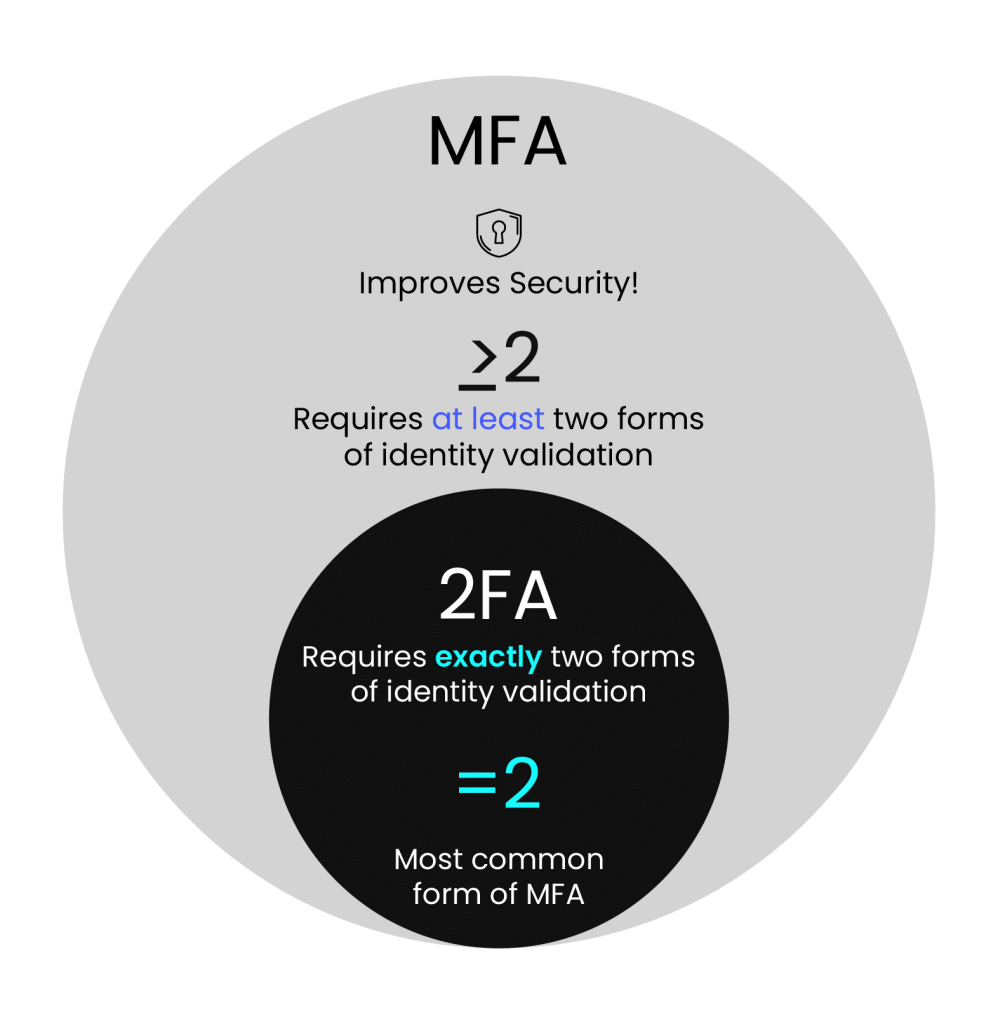
| Attribute | Two-Factor Authentication (2FA) | Multi-Factor Authentication (MFA) |
| Number of factors | Exactly two | Two or more |
| Typical combination | Password plus an OTP or app code | Password plus device plus biometric, in any combination of categories |
| Relationship | Every 2FA setup is a form of MFA | MFA is the umbrella term |
| Security ceiling | Limited if both factors are phishable | Higher; can require a phishing-resistant factor |
Consider online banking. With 2FA, you enter your password and then a one-time code. With a third factor added, an attacker who has stolen both your password and your phone number is still blocked by the fingerprint check. Layering factors from different categories is what raises the bar.
How Is MFA Different from Single Sign-On (SSO)?
MFA strengthens how a user proves identity, while single sign-on (SSO) reduces how often the user has to prove it. SSO lets a user authenticate once and then access multiple connected applications without logging in again. Google accounts are the everyday example: sign in to Gmail and you move into Drive, Calendar, Docs, and YouTube without re-entering credentials.
The two solve different problems and work best together. SSO concentrates authentication into a single event, which makes that one event a high-value target; protecting it with MFA closes the gap. Most organizations therefore front their SSO portal with centralized MFA, giving users one strong login instead of many weak ones.
What Is Adaptive Authentication (Adaptive MFA)?
Adaptive authentication, also called risk-based MFA, adjusts the level of verification to the risk of each login attempt. The system scores contextual and behavioral signals, including the user’s location, role, device, network, and time of login, and steps up authentication only when the score warrants it. An employee opening a company application from a cafe on a personal phone may be asked for an additional code after entering credentials, because the unknown network raises the risk score. The same employee logging in from the office network on a managed laptop passes with a single step. Conventional MFA challenges everyone identically on every login; adaptive MFA reserves the friction for the logins that look risky, which keeps security high without wearing down legitimate users.
Important Things to Know About MFA
A few practical points matter before and after you turn MFA on.
- You can choose your second factor: Options include authenticator apps, hardware security keys, passkeys, biometrics, and OTPs by SMS or email. Pick the strongest option the service supports.
- It is becoming standard practice: Google, Microsoft, Apple, and AWS now mandate or default to MFA for sensitive actions and privileged accounts rather than merely offering it.
- MFA protects you even after a password leak: Reused passwords fuel credential stuffing. With MFA enabled, a leaked password alone cannot open the account.
- Some services use adaptive MFA: The extra step appears only under suspicious conditions, such as a new device or location, which keeps everyday logins fast.
- MFA is simple to use: Setup usually takes a few clicks in account settings, and the added step at login takes seconds.
- MFA is essential for shared accounts: For a shared business mailbox or collaboration tool, MFA keeps access limited to authorized team members even if the shared password leaks.
Best Practices for Implementing MFA and SSO
Ten practices separate an MFA rollout that sticks from one that users route around.
- Assess your security needs first: Map which users, systems, and applications handle sensitive data, and deploy MFA to the highest-risk areas before extending it everywhere.
- Prefer phishing-resistant methods: Choose FIDO2 security keys, passkeys, or platform biometrics over SMS OTPs, which remain exposed to SIM swapping and relay phishing.
- Use adaptive MFA where it fits: Context-aware step-up keeps friction low for routine logins and raises the bar when the device, network, or location looks unusual.
- Integrate MFA with SSO: One strong, MFA-protected login into the SSO portal beats many weak logins scattered across applications.
- Enforce MFA on all critical systems: Cover administrative accounts, VPNs, cloud consoles, and any system holding regulated data; PCI DSS 4.0.1 already requires it for every user touching the cardholder data environment.
- Train your users: Explain why MFA exists, how to enroll, and how to recognize push-bombing and OTP-relay attempts so approval fatigue does not become the weak link.
- Monitor and audit authentication activity: Review logs for failed attempts, unusual locations, and anomalous approval patterns, and alert on them.
- Provide backup methods: Issue recovery codes or a secondary verified factor so a lost phone does not become a lockout or a help-desk social-engineering opening.
- Review policies regularly: Revisit MFA settings against current guidance such as NIST SP 800-63B-4, and retire weak factors as stronger ones roll out.
- Pair MFA with role-based access control: RBAC limits what an account can reach, so even a compromised, MFA-bypassed account has a small blast radius.
How Encryption Consulting Helps
Encryption Consulting’s Encryption Advisory Services help organizations design authentication strategies that fit their risk profile and compliance obligations. An in-depth Encryption Assessment reviews your current authentication mechanisms, measures gaps against standards such as NIST SP 800-63B-4 and PCI DSS 4.0.1, and delivers a roadmap to phishing-resistant MFA across on-premises, cloud, and hybrid environments. Backed by ISO/IEC 27001:2022 and SOC 2 certified practices.
Frequently Asked Questions
What is multi-factor authentication in simple terms?
Multi-factor authentication means proving who you are in two or more different ways before an account lets you in. Typically you enter a password, then confirm a second factor such as a code from an authenticator app, a security key, or a fingerprint. If an attacker steals your password, they still cannot sign in without that second factor.
Is multi-factor authentication the same as two-factor authentication (2FA)?
No. Two-factor authentication (2FA) is a subset of multi-factor authentication that uses exactly two verification factors, such as a password plus a one-time code. MFA is the broader category and covers any method that uses two or more factors, including three-factor setups that add biometrics. Every 2FA implementation qualifies as MFA, while MFA itself can extend to three or more factors.
What is phishing-resistant MFA?
Phishing-resistant MFA uses public-key cryptography bound to the legitimate website, so there is no code for an attacker to intercept or trick a user into typing. CISA recognizes two implementations: FIDO2/WebAuthn authentication, which includes passkeys and hardware security keys, and PKI-based authentication such as PIV smart cards. NIST SP 800-63B-4 requires services assessed at AAL2 to offer a phishing-resistant option.
Is SMS-based MFA still safe to use?
SMS one-time passwords are better than a password alone, and they remain the weakest common MFA method. They are vulnerable to SIM swapping, SS7 interception, and phishing pages that relay codes in real time. CISA recommends moving to FIDO2/WebAuthn where possible and treating SMS as a fallback. NIST SP 800-63B-4 does not classify any one-time password method as phishing-resistant.
How effective is MFA at preventing account compromise?
A 2023 Microsoft Research study of Azure Active Directory accounts found that MFA reduces the risk of compromise by 99.22 percent across the population, and by 98.56 percent for accounts whose credentials had already leaked. Google reported a 50 percent drop in compromised accounts after auto-enrolling more than 150 million users in 2-Step Verification. Effectiveness is highest with phishing-resistant methods.
What is adaptive MFA?
Adaptive MFA, also called risk-based authentication, evaluates signals such as location, device, user role, and time of login before deciding how much verification to require. A familiar user on a known corporate device may sign in with a single step, while a login from a new device or unusual location triggers an additional challenge. It balances security with user convenience.
Strengthen Your Authentication Strategy
Ready to close the gaps in how your organization authenticates users? Assess your encryption and authentication strategy with an Encryption Assessment, or talk to an Encryption Consulting advisor
- Key Takeaways
- How Does Multi-Factor Authentication Work?
- Types of Multi-Factor Authentication
- Why Is Multi-Factor Authentication Essential?
- Phishing-Resistant MFA: The New Baseline
- Are MFA and 2FA the Same?
- How Is MFA Different from Single Sign-On (SSO)?
- What Is Adaptive Authentication (Adaptive MFA)?
- Important Things to Know About MFA
- Best Practices for Implementing MFA and SSO
- How Encryption Consulting Helps
- Frequently Asked Questions
- Strengthen Your Authentication Strategy